In this guide 8 sections
Higgsfield AI earth zoom out is the “Earth zoom” effect: you give it one photo, and it makes a clip that pulls back from you to space. We did not run the Higgsfield preset itself, because its price could not be read before a run (2026-10-26). To show the move, we gave our own start frame (2 credits on Nano Banana Pro, 2026-10-21) to Kling 3.0 image-to-video inside Higgsfield: 7.5 credits, 1 try, shown at the top of this page with its flaws. Every claim about the preset’s own video still says “not tested” or “not verified”. No free route for this effect is verified; the vendor-claimed free tools are in the free section.
What the Earth Zoom Out template does
Earth zoom out is a photo to video effect: the clip starts on a person and pulls back until Earth hangs in space (Kapwing, 2025-07-23). Kapwing is a third-party video editor, not Higgsfield, and its 2025 tutorial may be outdated. The move works like a drone pull-back that keeps climbing past the buildings and the sky. Kapwing’s example prompt ends on a satellite view of Earth, a globe rotating in the dark with the person’s location marked by a glowing dot. The Higgsfield effects page (crawled 2026-10-20) lists the effect as “Earth zoom” with a Generate button.
Earth zoom in, the reverse, is not a separate Higgsfield effect: the effects page lists no “Earth zoom in” (crawled 2026-10-20). You can get one by reversing a zoom-out clip in an editor; Earth zoom in vs zoom out covers it.
Disclosure: we may earn a commission if you subscribe through our Higgsfield links, and each one is marked “(commission link)”. The commission does not change what we test. Details are in the affiliate disclosure.
How to do the earth zoom out effect on Higgsfield, step by step
Higgsfield’s official pages describe only the entry point: Effects, then “Earth zoom”, then Generate (higgsfield.ai/effects, crawled 2026-10-20). Everything after the Generate button is not verified as of 2026-10-21, because we did not open the generator screen. The only detailed description we hold is Kapwing’s third-party walkthrough of 2025-07-23, and the interface may have changed since. How Higgsfield’s Apps and Effects catalogs fit together is covered in what Higgsfield AI is.
- Make or pick a start photo. Our test frame and the photo rules are in Which photo works best.
- Open the template: Earth zoom on Higgsfield (commission link). If the link does not land on the effect, open Effects and choose “Earth zoom”.
- Press Generate and upload the photo as the reference image.
- Write a short prompt or start from an example. Kapwing (2025-07-23) reports that clicking an example clip shows its prompt, and that an “Enhance On” switch rewrites your prompt with extra detail.
- Choose the model and length if the screen offers them. Kapwing listed 3 or 5 seconds, a seed and a “Lite” model for free users (2025-07-23). That may be outdated: not verified as of 2026-10-21.
- Check the cost before you confirm. Higgsfield’s help center says the exact cost is shown on the Generate button before you confirm (fetched 2026-10-21).
- Render and download. The preset’s render time, quality and result: not tested. Our Kling 3.0 stand-in finished in about 1.5 minutes (2026-10-26).
Settings and facts at a glance, each with its source and status:
Item | Value | Source and date | Status |
|---|---|---|---|
Official template URL | higgsfield.ai/effects/use/earth-zoom-exported | Higgsfield effects page, crawled 2026-10-20 | verified |
Start-frame model | Nano Banana Pro, 2 credits, 1 try | our log, 2026-10-21 | tested |
Start-frame format | 9:16, 1k resolution, 768 × 1376 pixels | our log and image file, 2026-10-21 | tested |
Video length options | 3 or 5 seconds | Kapwing (third party), 2025-07-23 | not verified as of 2026-10-21 |
Model for free users | Lite | Kapwing (third party), 2025-07-23 | not verified as of 2026-10-21 |
Free-plan limit | 2 Earth zoom videos per day | Kapwing (third party), 2025-07-23 | not verified as of 2026-10-21 |
Video credit cost | not listed | Higgsfield pricing page, crawled 2026-10-20 | not verified as of 2026-10-26 |
Preset price before a run | not shown: "not yet supported for Higgsfield presets" | our log (Higgsfield MCP), 2026-10-26 | preset not run |
Rendered clip, Higgsfield preset | none | our log, 2026-10-26 | not tested |
Rendered clip, Kling 3.0 image-to-video | 5 s, 716 × 1284, no sound, 7.5 credits, 1 try | our log, 2026-10-26 | tested, not the preset |
Read the table this way: the start-frame numbers and the Kling 3.0 clip are ours; every figure about the preset’s own video is a third-party claim or missing.
How many credits does it cost?
The Higgsfield AI earth zoom out effect’s credit cost is not verified as of 2026-10-26. It does not appear in the pricing table we crawled on 2026-10-20, and on 2026-10-26 the preset showed no price before a run through the Higgsfield MCP connection we test with, so we did not run it. We measured two costs: the start frame, 2 credits on Nano Banana Pro (2026-10-21), and our Kling 3.0 image-to-video clip from it, 7.5 credits for 5 seconds in standard mode (2026-10-26). That clip stands in for the move; it is not the preset’s price. Read the effect’s own cost on the Generate button before you confirm (step 6).
For plan prices and what a credit buys, see credit cost on the pricing page.
Which photo works best
A good start frame is outdoors, sharp and shows the background, says Kapwing (2025-07-23), a third-party editor. Kapwing suggests an HD photo of around 1920 × 1080 pixels. Pick the frame before you open the generator, because the clip starts from your photo. Our motion control start-frame checklist differs: it wants a full body and free arms.
Our frame is high-angle on purpose. The camera moves away from the subject. A frame that already looks down on a rooftop gives the pull-back streets and roofs to travel through. A face-height shot against a wall gives it nothing to reveal.
Check the frame against four points before you spend credits on the video. The subject is small enough that the surroundings fill most of the picture. The horizon or the rooftops are visible, so the pull-back has terrain to cross. The light is daylight, since Kapwing asks for a well-lit photo. The frame is vertical, 9:16 like ours, if you will post it as a Reel or Short.
Kapwing (2025-07-23) reports that the video keeps the reference image’s aspect ratio, which is why the 9:16 point matters. That checklist is our reasoning from one test frame and Kapwing’s criteria, not a measured result from rendered videos. A second start frame on Nano Banana Pro costs another 2 credits at our 2026-10-21 charge. Fix the frame first, because the video render sits on top of it: the preset’s cost is not verified, and our Kling 3.0 clip from this frame cost 7.5 credits.
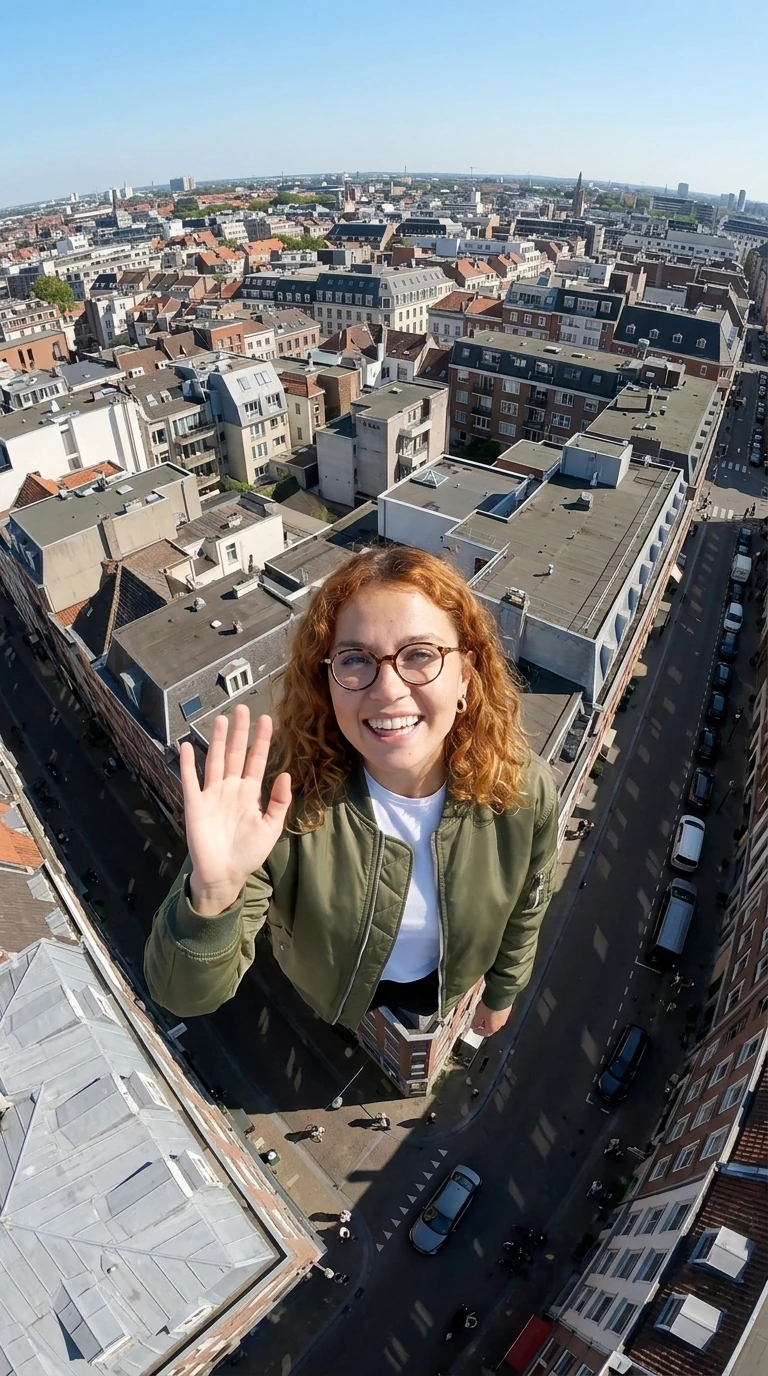
AI-generated test image of our fictional test character. Nano Banana Pro via Higgsfield, 2026-10-21, 2 credits, 1 try.
This is our fictional, AI-generated test character (how we test). Our log marks identity as held on 1 try. The job record labels the model nano_banana_2, as it did for every Nano Banana Pro job we ran that day. We report the record and draw no conclusion.
By eye, the horizon bends as if shot through a wide-angle lens. Her body also looks oversized against the street below. It is a single sample at 768 × 1376 pixels, below Kapwing’s HD suggestion. The wide-angle bend carried over into our Kling 3.0 clip, which came out at 716 × 1284; whether a larger frame improves the preset’s video is not tested.
Which frames fail is Kapwing’s advice, not our test. Close-up portraits with solid or unclear backdrops leave the effect no scene to reveal. Kapwing recommends outdoor scenes because the zoom passes through a city or a landscape. Blurry or pixelated photos lose detail. We did not test a failing frame, and our Reddit corpus of 2026-10-20 holds no Earth zoom threads, so we cite no community reports.
Earth zoom in vs zoom out
Zoom out starts on the person and ends in space. Zoom in is the reverse, a Google Earth style dive from space down to the person. Higgsfield lists only the zoom-out version (effects page, crawled 2026-10-20), while GoEnhance has a separate “Earth Zoom In” page (goenhance.ai, crawled 2026-10-20). The preset catalog we read through the Higgsfield MCP connection on 2026-10-26 showed two entries: a Viral “Earth zoom” preset described as a camera that plunges from orbit to street level, which is a zoom in, and a legacy “Earth zoom out” preset that pulls back from a face to orbit. Neither showed a price before a run, so we ran neither. Reverse playback adds no Higgsfield credits: render the zoom out once, then reverse the clip in an editor. Kapwing’s 2025-07-23 tutorial reverses a copy of the clip with its Reverse video toggle to build a loop; we did not test reverse playback.
Can you do earth zoom out for free?
We verified no free route for this exact Higgsfield effect as of 2026-10-21. Higgsfield has no trial period and offers a free tier with a limited set of models (Higgsfield help center, fetched 2026-10-21). Kapwing (2025-07-23) wrote that free-plan users could make up to two Earth zoom videos per day. That third-party statement may be outdated, and we could not confirm it. Our test account is a paid Plus plan, so the free tier is not tested.
Two vendors call their earth zoom pages free; treat each as a vendor claim, not a tested free alternative. For a CapCut earth zoom, the route we found is Dreamina, CapCut’s AI generator. Its page is titled “Earth Zoom Out AI Video Generator Free” and describes building the zoom from text prompts (dreamina.capcut.com, crawled 2026-10-20). GoEnhance says its Earth Zoom In page has a free preview (goenhance.ai, crawled 2026-10-20). The GoEnhance and Monet earth zoom out pages state no free option in our crawl of 2026-10-20.
We tested none of these, and their free caps and watermark rules are not verified. Paying makes sense if you want this exact template with your own photo as the first frame. The broader free picture is at what is free on Higgsfield.
A start-frame prompt you can copy
This is the prompt we ran on 2026-10-21 (Nano Banana Pro via Higgsfield, 2 credits, 1 try, 9:16). It refers to a reference image of our test character:
Tested prompt
The same text as in the recipe card above. Copy it from the card
To use it on yourself, upload your own photo as the reference and change “the woman” so it describes the person in your photo. That edited version is not tested. Adults only, your own photo only; see the content policy.
Music: our Kling 3.0 clip was rendered with sound off and we did not run the preset, so whether the effect adds a soundtrack is not tested. Add a track whose license covers your platform, or use the platform’s own licensed sound library. Do not assume an example clip’s audio is yours to reuse.
Our test clip: Kling 3.0, not the preset
We did not run the Higgsfield Earth zoom preset: its price could not be read before a run, and we run a preset only at a confirmed price. To show the move, we gave our start frame to Kling 3.0 image-to-video inside Higgsfield on 2026-10-26: standard mode, 9:16, 5 seconds, sound off. It charged 7.5 credits, the same as the quote, on the first try, and finished in about 1.5 minutes. This is the prompt we ran:
Tested prompt
One continuous unbroken camera pull-back: the shot starts on the woman waving on the city rooftop, then the camera rises straight up and away, faster and faster, revealing the surrounding rooftops and streets, then the whole city, then a layer of clouds, and finally the curve of planet Earth glowing against black space. Smooth aerial zoom out, no cuts.
What the clip shows (it has no sound): she waves on the rooftop and shrinks as the camera pulls up (0 to 1.2 s), then the city grid (1.2 to 3 s), a cloud layer at about 3.3 s, and the curve of Earth against black space with a sun flare (4 to 5 s). Our log notes two flaws: a city block stays visible as a large patch inside the clouds at orbit height, an impossible scale, and the wide-angle bend of the start frame carries over. One clip is a sample, not a verdict on Kling 3.0 or on the preset.
Recreate on Higgsfield (commission link)
More one-click formats are in templates.