In this guide 9 sections
Higgsfield AI motion control runs on Kling Motion Control in two versions, and the pricing page we crawled on 2026-10-20 lists it at roughly 5 credits per 5 seconds (Kling 2.6, 720p) up to roughly 12 (Kling 3.0, 1080p). The Free plan does not include it; the free routes outside Higgsfield are in the free section. On 2026-10-26 we ran Kling 3.0 Motion Control on our own start frame and our own mannequin clip: it charged 10 credits for 5 seconds, more than the ~7 listed for Kling 3.0 at 720p. The clip is at the top of this page, flaws included; two earlier attempts failed and were refunded (our test run).
Disclosure: we may earn a commission if you subscribe through our Higgsfield links, and each is marked “(commission link)”. It does not change what we test. Details are on affiliate disclosure.
Does Higgsfield have motion control?
Yes, Higgsfield AI motion control exists: the pricing page crawled on 2026-10-20 lists four Kling Motion Control rows, Kling 2.6 and Kling 3.0 at 720p and 1080p each (higgsfield.ai/pricing, crawled 2026-10-20). Motion control is motion transfer, a kind of character animation. You supply a still image of a character and a reference video of someone moving. The model animates your character with the movement from the video.
The still sets who appears. The video sets how they move. Most of this page is about the still, the file you control most. Our test used both: our start frame and a driving clip we generated ourselves. For a dog, our AI dog dance video test took the other route: one photo and a prompt, no reference clip, on Kling 3.0 and Hailuo 02 (2026-10-27). Pet motion transfer: not tested.
How to use Higgsfield AI motion control, step by step
Prepare two files, then run one job. The steps below combine our own run of 2026-10-26 with the method community users describe.
- Pick the reference video. Use a clip of you, or a clip you hold the rights to. Keep one person in frame; a Reddit guide says to add a reference video with one person only (r/HiggsfieldAI, 2026-01-17).
- Grab its first frame. One commenter wrote that “99% of them Copy the exact First Frame of the Video” into a Nano Banana Pro image and use that with Kling Motion Control (r/HiggsfieldAI, 2026-02-21). We call this the first-frame method.
- Make the start frame. Generate a full-body image of your character in the same pose and framing as that first frame. Details are in the next section.
- Upload both. Add the image and the video to Kling Motion Control, choose the version and the resolution, and submit. The pricing page lists the cost per 5 seconds of video (see the table below).
- Rerun with small changes. Change the image, not the video, when the result drifts.
Recreate on Higgsfield (commission link)
What does the source image need?
The source image needs a full body, a background you want in the clip, free arms and the same aspect ratio as the video. That list is our own checklist from the first-frame method and one test image. It is not a Higgsfield rule; we found no input specification on the crawled pages (not verified as of 2026-10-21).
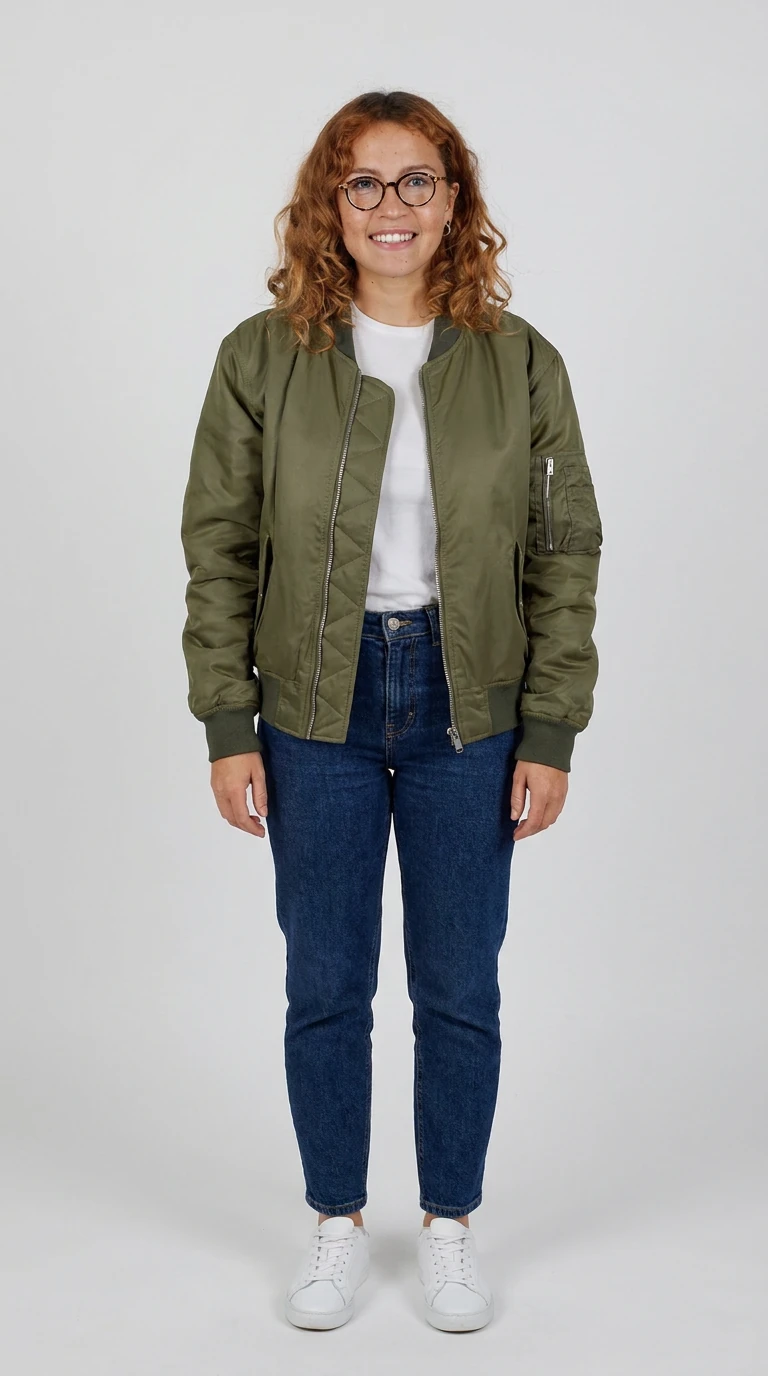
Our start frame (run G3) shows our fictional, AI-generated test character. It used Nano Banana Pro, charged 2 credits, took 1 try and came out at 9:16. The prompt was: “Full-body photo of the woman from the reference image standing in a neutral pose, arms relaxed, whole outfit visible: olive bomber jacket, white t-shirt, dark jeans, white sneakers. Plain light-grey studio background, even soft light, feet fully in frame. Start frame for a motion control dance video.” Our log marks the result as full-body, neutral pose, feet in frame. The job record labeled the model nano_banana_2 although we requested Nano Banana Pro, as on every one of our 10 jobs that day (our log, 2026-10-21); we draw no conclusion from it.
Check four things before you upload:
- Full body. Head to feet in frame. If the video shows a dance, the model has to invent any limb the image hides.
- The background you want. One commenter says Kling keeps the reference image’s background, not the video’s (r/StableDiffusion, 2026-04-06). Pick the backdrop on purpose; our plain gray suits a test, not every post.
- Arms free. Arms away from the torso and nothing in the hands, unless the video also holds that object.
- Matching aspect. 9:16 image for a 9:16 clip. A mismatch forces a crop, and a crop can cut the feet.
We did not test whether a pose that differs from the video’s first frame changes the result.
How many credits does motion control cost?
Kling 2.6 Motion Control costs about 5 credits per 5 seconds at 720p and about 7 at 1080p; Kling 3.0 costs about 7 at 720p and about 12 at 1080p (higgsfield.ai/pricing, crawled 2026-10-20). The page marks every figure with “~”, so the charge is approximate.
Model and resolution | Credits per 5 s | Free | Starter | Plus | Ultra |
|---|---|---|---|---|---|
Kling 2.6 Motion Control 720p | ~5 | Not included | 648 videos | 2880 videos | 7200 videos |
Kling 2.6 Motion Control 1080p | ~7 | Not included | 432 videos | 1920 videos | 4800 videos |
Kling 3.0 Motion Control 720p | ~7 | Not included | Not included | 1920 videos | 4800 videos |
Kling 3.0 Motion Control 1080p | ~12 | Not included | Not included | 1152 videos | 2880 videos |
Checked 2026-10-20 by editorial review, from the crawled pricing page. The page does not label the “videos” counts; we copy them as shown.
The counts match 12 months of each plan’s credits divided by one 5-second clip. Starter lists 270 credits a month, and 270 × 12 ÷ 648 gives 5 credits per clip for Kling 2.6 720p. The same division gives 7.5 credits for both “~7” rows and 12.5 for Kling 3.0 1080p (Plus: 1,200 × 12 ÷ 1,152). That arithmetic is ours, not a vendor figure. Our own charge was higher: 10 credits for one 5-second Kling 3.0 Motion Control clip in standard mode at 720 × 1280 on 2026-10-26, against “~7” on the page; the quote shown before the run also said 10.
Two readings follow from the table. Kling 3.0 Motion Control is not included on Starter, so a Starter account is limited to 2.6. And a 15-second reference clip at Kling 3.0 1080p works out to about 36 credits (3 × ~12), or 37.5 at the implied 12.5, before any rerun. That arithmetic is ours as well.
A Reddit guide posted on 2026-01-17 says Kling Motion Control is unlimited on Higgsfield. The crawled pricing page shows credit rows instead, and the unlimited-models help page does not name Kling Motion Control (higgsfield.ai help center, fetched 2026-10-21). Whether it is unlimited now: not verified as of 2026-10-21. A thread titled “Scumbags keep changing the price of Kling motion control” (r/HiggsfieldAI, 2025-12-29) shows users already complained about price changes; one commenter wrote that they canceled and found it “cheaper to use Kling in Kling itself” (2026-01-03). Check the live pricing page before you submit. More rows are on Higgsfield pricing.
Does Kling 3.0 have motion control?
Yes: Higgsfield lists Kling 3.0 Motion Control at 720p and 1080p, on Plus and Ultra only (higgsfield.ai/pricing, crawled 2026-10-20). We ran Kling 3.0 Motion Control once successfully (2026-10-26) and Kling 2.6 not at all, so we have no 2.6-versus-3.0 quality comparison: “not tested”.
One Reddit user who says they spent plenty on Kling Motion Control 2.0 and 3.0 wrote that it “still sometimes (although rare) messes up” (r/StableDiffusion, 2026-04-06). That is a claim from one user, not a measurement. For Kling outside Higgsfield, see our Kling page.
Reference video: length, framing, what fails
The crawled pricing page prices motion control per 5 seconds and states no maximum clip length; the limit is not verified as of 2026-10-21. Every extra 5 seconds adds that row’s charge, so trim the clip to the move you need. The failures below come from dated community posts; our own run follows in the next section.
- Identity drift. One user reported “Yeah I do this. Still identity drift” after using the first-frame method (r/HiggsfieldAI, 2026-02-21). Another replied that with a good picture “the video be perfect” (same thread, 2026-02-21). The two reports conflict; treat the start frame as the variable.
- Background from the image only. The April 2026 commenter says Wan Animate and SCAIL can switch to the source video’s background, where Kling uses the reference image (r/StableDiffusion, 2026-04-06). If you need the video’s setting, that comment points away from Kling.
- Multiple people. The same commenter says Kling is weaker than one open-source tool with several people in the clip. The January guide’s advice to use one person only fits that.
- Samey results. A commenter on the “Kling motion control is crazy” thread wrote “If it was that good, all these vids wouldn’t look the same” (r/HiggsfieldAI, 2026-02-06). A reply said it depends on the image and the video prompt.
Fast spins, hands and occlusion are failure modes we expected. We found no dated quote for them, so we do not claim them.
Our test run: what failed and what held
We ran Kling 3.0 Motion Control three times on 2026-10-26, on a Higgsfield Plus account: standard mode, 5 seconds, background taken from the start image. The start frame was the one above. We generated the driving clip ourselves with Kling 3.0 text-to-video, so no real person’s movement, face or music went in.
- Runs 1 and 2 failed. Both used a faceless white jointed mannequin that ends the clip in profile. Both failed with no error text, and both 10-credit charges were refunded.
- Run 3 completed. Its driving clip was a clothed mannequin that dances facing the camera the whole time. It finished in about 3.3 minutes and charged 10 credits. Only the driving clip changed, so the start image and a moderation check are unlikely causes; whether the clothes, the face features or the frontal pose mattered, we did not separate.
- What held. She stays recognizable (curly hair, round glasses, earring, olive bomber, jeans, white sneakers), repeats the moves beat for beat and keeps her feet in frame. The background came from the start image, as we set it.
- What failed. On fast moves, around 1.9 s and 4.4 s, the face blurs and the glasses go hazy. The smile of the start frame turns into a neutral, pursed look, and the face reads slightly broader mid-clip. The hands stay fists, as in the driving clip; we saw no finger glitches in the frames we sampled.
- Output. 720 × 1280 at 30 fps, while the driving clip ran at 24 fps; no sound and no visible watermark.
The driving clip cost 7.5 credits. A first clothed version that barely moved, a shop dummy on a stand, cost another 7.5 and was not used, and the faceless clip behind runs 1 and 2 cost 7.5 as well. In all, this test cost 32.5 credits. One completed clip is a sample, not a failure rate.
How to do motion control for free?
Free motion control on Higgsfield is not available: the Free plan does not include any of the four motion-control rows (higgsfield.ai/pricing, crawled 2026-10-20). Three other routes exist, all unverified by us.
- Kling directly. Kling has a $0 account with monthly login credits but publishes no amount for them (kling.ai, fetched 2026-10-21); details are on Kling AI image to video. Whether those credits cover Kling’s own motion control: not verified as of 2026-10-21.
- Open-source models. A r/StableDiffusion commenter names Wan Animate and SCAIL as options, and says Kling is “much superior” for facial likeness and movement (2026-04-06). You need your own hardware or a host.
- Higgsfield’s other free routes. See Higgsfield free for what the Free plan does include.
Can it copy a TikTok dance?
Dance transfer works like any motion transfer: the tool takes an uploaded reference video. You may only use footage you have rights to. Use your own clip, or one with a license that allows it. Do not upload other people’s footage without their permission. A dance video’s soundtrack adds a music-rights question: if you post the result with that song, the song needs a license on the platform where you post. Higgsfield’s Terms of Use also say you must be at least 18 (higgsfield.ai terms §2.1, fetched 2026-10-21).
Consent comes first. Use your own body and photo, or an adult who agreed. Do not use images of minors.
The template-driven alternative is Genjutsu, where a preset holds the driving video and you add only your image; see Higgsfield Genjutsu. Our test of that route was a logged skip, because its driving video showed real people. For a tested look at the dance trend, see AI dance video, and the parent hub is Templates.
When paying makes sense: you need Kling 2.6 or 3.0 Motion Control inside the same credit balance as your image models, and you accept that the charge can change. Recreate on Higgsfield (commission link)