In this guide 7 sections
An AI dog dance video starts with one full-body photo of your pet and one prompt. On 2026-10-27 we ran that route on Higgsfield with a fictional, AI-generated dog. Kling 3.0 charged 7.5 credits for a 5-second clip and Minimax Hailuo 02 charged 6 credits for a 6-second request, 1 try each. The photo cost 2 credits: 15.5 credits in all. Kling 3.0 showed more of the moves we asked for; Hailuo 02 kept the dog closer to the photo. This is one run per model, not a ranking.
To copy a specific trending dance, you need motion transfer instead: a pet photo plus a reference clip. We did not test that route, and we did not test a cat. For human dancers, see the AI dance video guide.
Everything here is AI-generated; no real pet, person or third-party clip went in. Method: how we test.
Part of the AI effects hub.
How do I make an AI video of my dog dancing? (tested 2026-10-27)
To make an AI dog dance video, pick an AI app or model that does image-to-video, give it a full-body photo and a prompt that lists the moves. Our three steps, credits as charged:
- Pick the start photo: your own pet, whole body in frame. Ours came from a text prompt (scruffy mixed-breed, whole dog in frame, living room) in Nano Banana Pro at 1k and 9:16: 2 credits, 1 try.
- Check the frame before you spend on video. Ours has the hindquarters and tail cut by the left edge, although the prompt asked for the whole dog.
- Send the photo to each model with the prompt below.
Our video prompt, verbatim, identical for both models:
The dog from the image dances happily to an upbeat rhythm: it rises onto its hind legs, bounces in place, sways side to side and paws the air with its front legs in time to the beat, then drops back onto four paws and does a quick little spin. Same dog, same living room, static camera at the dog’s eye level, playful viral pet-dance clip, natural fur motion.
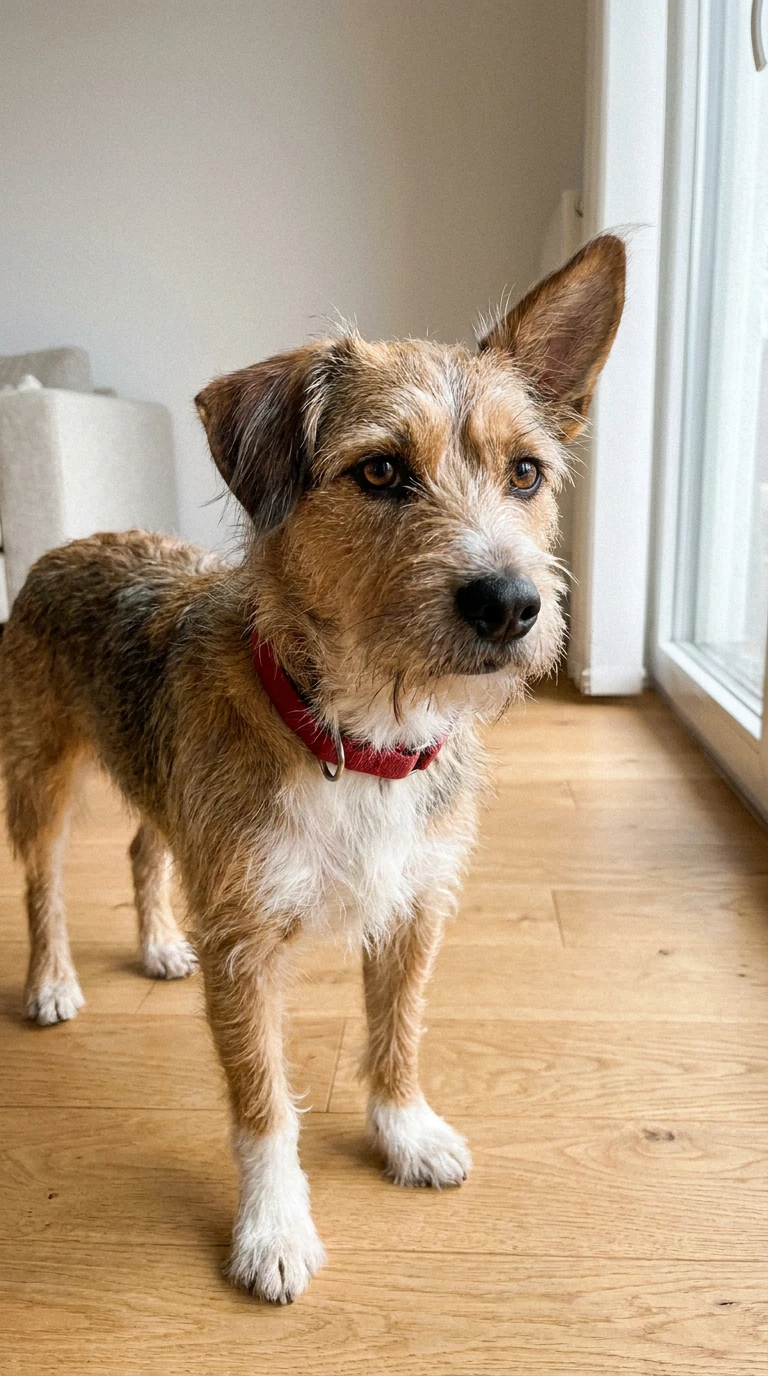
AI-generated start image of a fictional dog. Nano Banana Pro via Higgsfield, 2026-10-27, 2 credits, 1 try.
The job we requested as Nano Banana Pro came back labeled nano_banana_2; the billing line reads “Nano Banana Pro”. We draw no conclusion.
Same dog photo, two models: Kling 3.0 vs Hailuo 02
In this AI dog dance video test, Kling 3.0 cost 1.5 credits more and showed more choreography; Hailuo 02 held the dog’s look better. Logged 2026-10-27, one try each, no audio:
Kling 3.0 std | Minimax Hailuo 02 768p | |
|---|---|---|
Charge (our test, 2026-10-27) | 7.5 credits | 6 credits |
Clip delivered | 5.04 s, 716 x 1284, 24 fps | 5.875 s for a requested 6 s, 768 x 1376, 24 fps |
Moves we saw | Still 0 to 1 s; hind legs, front paws swiping 1.5 to 3 s; four paws about 3.5 s; spin 4 to 4.8 s | Paw lift about 0.5 s; upright hopping, paws tucked, 1 to 4.5 s; turns right about 5 s; ends mid-turn |
Flaws | Heavy motion blur 3.5 to 4.5 s; tail color changes; ear tips touch the top edge at 1.5 s | Ear tips cut by the top edge for most of the upright phase; less paw-waving than asked |
Look vs start frame | Recognizable; the tail is invented and changes color | Coat, collar, face stay closer |
Our log marks both clips as coherent: one dog, one dance. List prices on Higgsfield’s pricing page were about 7 credits per 5 seconds for Kling 3.0 at 720p and about 6 credits per 6 seconds for Hailuo 02 at 768p (pricing page, checked 2026-10-20).
Why Kling 3.0 and not Kling 2.5 Turbo. We planned Kling 2.5 Turbo. On 2026-10-27 it was not in the Higgsfield MCP model catalog we generate through, so we ran Kling 3.0 instead. Higgsfield’s pricing page listed Kling 2.5 Turbo 720p at about 4 credits per 5 seconds on 2026-10-20; we did not run it: not tested.
What went wrong, and what to do about it
Both clips have flaws we can time. Cropped start photo. The left edge cut the dog’s hindquarters and tail. Kling then invented a tail, dark with a white tip at 4.0 s and tan at 4.5 s. Check the whole animal and headroom before paying for video.
Fast spin. Kling’s spin (4 to 4.8 s) is its blurriest part; the 4.5 s frame, a rear view with the tail raised, is a poor thumbnail. Expect to cut or retry it.
Cut-off ending. Hailuo 02 delivered 5.875 s of 6 s and stopped mid-turn, not on four paws as asked. Trim before the turn. Our Hailuo 2.3 clip of the same day, on the Hailuo AI page, also stopped at 5.875 s of 6 s.
Retries. We ran none. One would cost 6 credits on Hailuo 02 or 7.5 on Kling 3.0 at the same settings.
Free pet dance apps: limits and watermark (vendor-stated)
No vendor page we read gives a free clip count for pet dancing. Every cell is what the vendor says, not what we measured; “not stated” means the page is silent.
Vendor page | Free as stated | Watermark as stated | Input as stated |
|---|---|---|---|
Dreamina AI dog dancing, checked 2026-10-27 | "free credits"; no amount | Not stated | One dog photo plus a prompt or style |
GoEnhance AI Pet Dance, checked 2026-10-27 | Not stated on this page | Not stated on this page | One pet photo; full-body photo advised |
Kapwing AI Dog Dance and Kapwing pricing, checked 2026-10-27 | Free plan: 10 credits, listed for auto-subtitling and text to speech; credits per dog clip: not stated | Free plan: "unlimited exports with a watermark"; whether it applies to this tool is not verified as of 2026-10-27 | Dog image plus a dance video under 10 s |
None of the three pages states how many free dog clips you get, so check the balance after you sign up.
We earn a commission if you subscribe through links marked “(commission link)”; it does not change what we test. See the affiliate disclosure.
- Free on Higgsfield: what is free on Higgsfield.
- Free elsewhere: the rows above; Viggle, Mango, Dreamface and Media.io terms are not verified as of 2026-10-27.
- When paying makes sense: when you need a specific model, such as Kling 3.0, or an export without a free-plan watermark; Kling’s own plans are on our Kling page.
Our Kling 3.0 clip ran on Higgsfield. The link below opens Kling’s own site, which bills in Kling credits; we have not run this test there: not tested.
Can I use any trending dance for my cat?
Not with a prompt alone: a prompt describes a dance in words and cannot copy a specific trending one. Copying a real choreography takes motion transfer: a pet photo plus a reference clip. Kapwing’s AI Dog Dance and AI Cat Dance pages both take a dance video under 10 seconds, as a video file, not a GIF (checked 2026-10-27). Cat input and pet motion transfer: not tested. Our human Kling 3.0 Motion Control clip is in the motion control guide. GoEnhance’s Kling AI dance page notes that a four-legged body “does not map perfectly to every human routine” (checked 2026-10-27).
Music. Our clips have no audio. If you add a track to a pet video, use music you own or are licensed to use. Dreamina’s AI dance generator page gives the same advice (checked 2026-10-27). Whether a trending track or choreography is free to reuse: not verified as of 2026-10-27. This page makes no legal promise about it.
How the viral dancing-dog videos are made
Tool pages describe the viral dancing-dog clips on TikTok as motion transfer: a dog photo plus a short dance clip. The first two in our Google US snapshot for “ai dog dance video” (2026-10-20), Kapwing and Mango, say so in their search snippets. Google’s AI Overview in that snapshot cited the same route. A user answer in r/NoStupidQuestions gives it in two steps. Take a decent picture of your dog or cat, then upload a video of the dance you want (thread, user report, checked 2026-10-20).
We ran the other route, image plus prompt: no reference clip, less control over the choreography, 6 to 7.5 credits per clip.
Sources checked
- Our test log, 2026-10-27: how we test. Runs H8-0 (photo), H8a (Kling 3.0), H8b (Hailuo 02); total 15.5 credits = 2 + 7.5 + 6.
- Higgsfield pricing, checked 2026-10-20.
- Kapwing AI Dog Dance, Kapwing AI Cat Dance and Kapwing pricing, checked 2026-10-27.
- Dreamina AI dog dancing and Dreamina AI dance generator, checked 2026-10-27.
- GoEnhance AI Pet Dance and GoEnhance Kling AI dance, checked 2026-10-27.
- r/NoStupidQuestions thread, user report, 2026-10-20.
- Search results: our Google US snapshot for “ai dog dance video”, including the AI Overview, 2026-10-20.