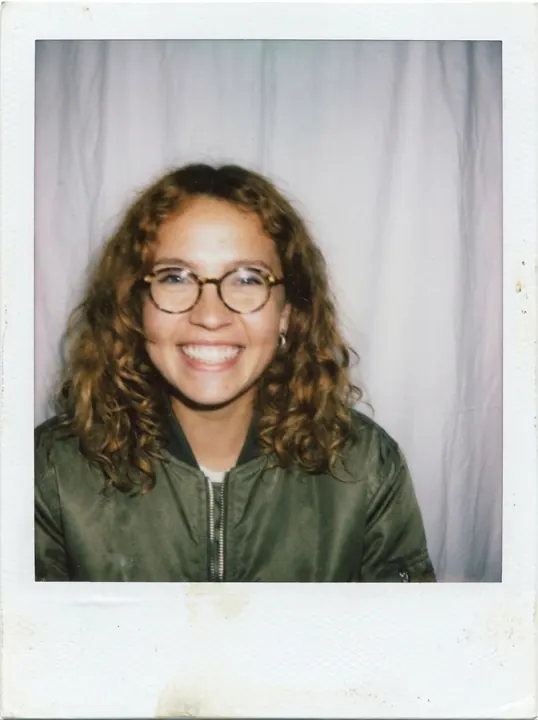

In this guide 9 sections
Status as of 2026-10-21: fading, still searched. In Google Trends US over the 12 months to 2026-10-20 (DataForSEO), “ai polaroid” peaked in the week of 2026-04-19. It stood at 11% of that peak in the week of 2026-10-18 (week still running at fetch). It stayed at or above 25% of peak for 40 of 52 weeks. We ran one flash-and-curtain polaroid prompt on two models inside Higgsfield on 2026-10-21. Nano Banana Pro cost 2 credits and Seedream 5.0 Lite cost 1 credit, and the log records one charged image each with no failed submission.
Disclosure: we may earn a commission if you subscribe through the Recreate link on this page. The commission does not change what we test or how we report it. Details in the affiliate disclosure.
How to do the Polaroid AI trend?
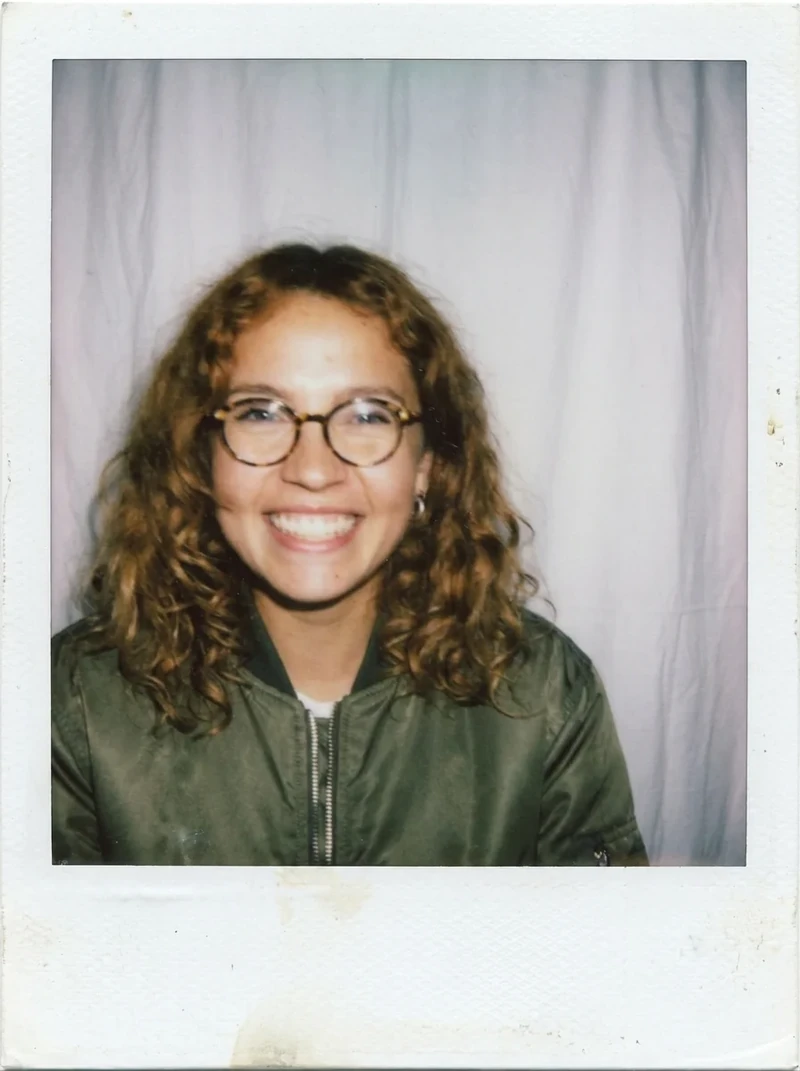
Upload one clear photo of yourself to an image tool that accepts a reference photo. Then paste a polaroid prompt and generate. The prompt should name the on-camera flash and the white curtain, plus the white polaroid frame. Google’s AI Overview for “ai polaroid trend” (US results, 2026-10-20) gives the same route in Gemini. Its steps: open Gemini, upload with the + button, paste the prompt, generate. It names Gemini as a free option. Our test ran the same recipe on a paid tool, so you can compare two models before you choose one.
Keep to your own photo. One version of the trend puts a famous person in the frame with you. We do not show or teach it (why). One Reddit user also reports an account disabled after trying the trend.
What is the AI Polaroid trend prompt?
This is the exact prompt we sent to both models on 2026-10-21, at aspect ratio 3:4. Nano Banana Pro ran at 1k resolution and Seedream 5.0 Lite at its default quality. The reference image was our fictional, AI-generated test character.
Tested prompt
The same text as in the recipe card above. Copy it from the card
To use it on yourself, upload your own photo. Then change “the woman” so it describes the person in your photo. Run it once as written, and after that change one thing at a time, so you can tell which edit moved the face.
The prompt that circulates in tutorials is a different one. Google’s AI Overview for “ai polaroid trend” (US results, 2026-10-20) quotes it with citations to an Instagram reel and a Threads tutorial.
Untested variation
Take a picture with a Polaroid camera. The photo should look like a normal photo, without any clear subject or props. The photo should have a slight blur and a consistent light source, like a flash from a dark room, spread throughout the photo. Do not change the faces. Replace the background behind the two people with a white curtain. They're hugging and smiling.
It is written for two people in one photo, so it needs the merge step from the younger-self section below. We have not run it: not tested.
The two-photo route also shows up on Reddit. A thread on r/GoogleGeminiAI titled “How to copy the viral Polaroid trend (you and your younger self)” dates from 2025-09-30 (reddit.com). A reply there on 2025-10-01 says to “first combine the image of your younger and older self” before you prompt. On 2025-10-19 a commenter on the same thread posted a longer prompt. It asks for a hug with your younger self in front of soft curtains, with facial features “100% accurate and unchanged”. Our prompt above is shorter and is our own wording, not a copy of any of these.
How to make AI Polaroid for free? (checked 2026-10-21)
As of 2026-10-21, start with a free app, because one image is enough for this trend. These are the free paths we can name:
- Gemini and ChatGPT both take an uploaded photo plus a text prompt. Their free-tier image limits are not verified as of 2026-10-21. We have not run this prompt on either: not tested.
- Dreamina (CapCut) says on its Gemini polaroid prompt page (crawled 2026-10-20) that it “offers free trial credits”. The page gives no daily amount: not verified as of 2026-10-21.
- Higgsfield: see what is free on Higgsfield. Our runs used a paid Plus-plan account, so they do not show what a free account gets.
Pay when you need more tries than the free credits allow, or a higher resolution. Skip any tool that asks for a card before your first image.
Our test: the same prompt on two models
We ran one prompt with one reference photo on 2026-10-21, and each model returned one charged image. Treat it as a single sample, not a ranking.
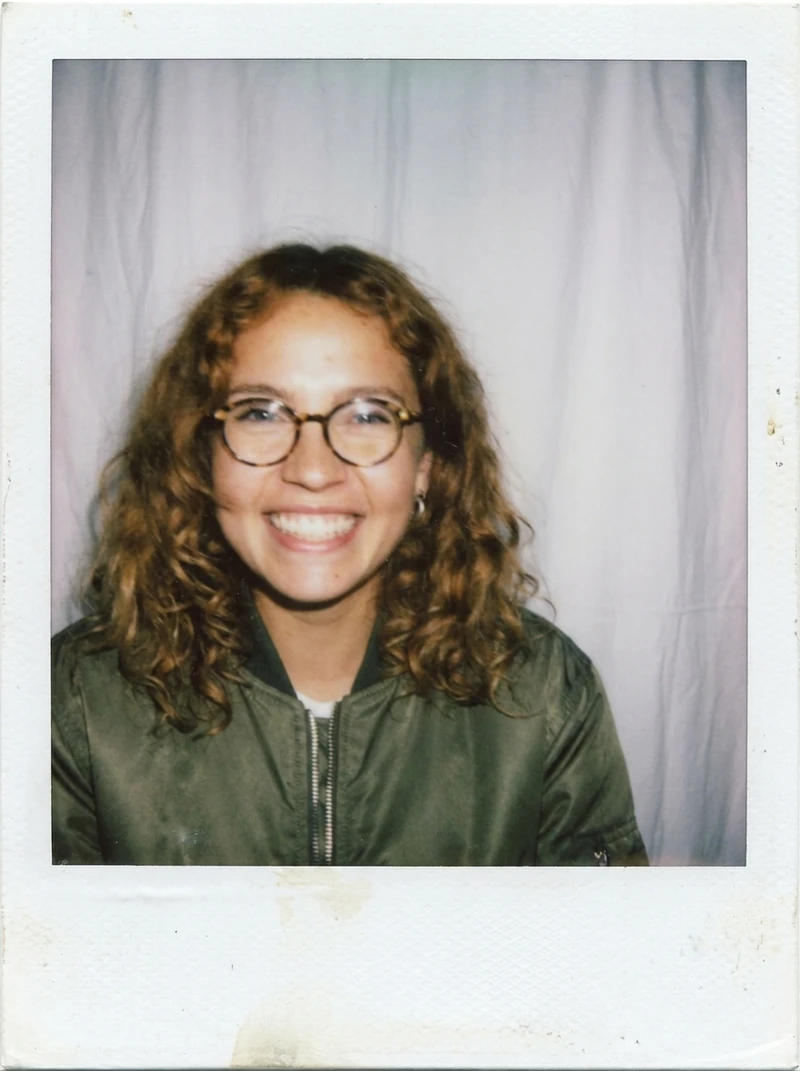
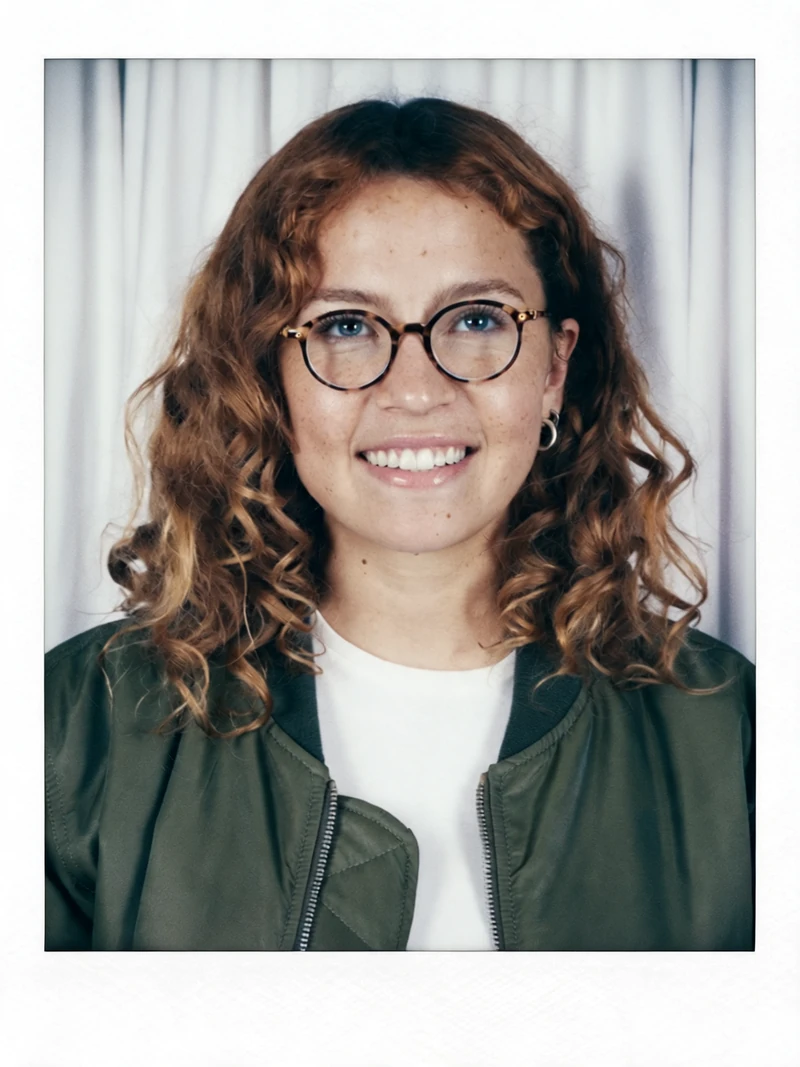
Nano Banana Pro | Seedream 5.0 Lite | |
|---|---|---|
Credits charged (our charge, 2026-10-21) | 2 | 1 |
Charged images | 1 | 1 |
Failed submissions logged | none | none |
Flash, curtain and frame in the output | all three (our log) | not logged separately |
Seedream 5.0 Lite cost half as much and gave a usable polaroid. By eye, its image is sharper, with less of the instant-film grain than the Nano Banana Pro image. Our log marks every requested element as present in the Nano Banana Pro run, frame border included. These are our observations on one sample, not a scored comparison. The two models split the same way on the Studio Ghibli-style prompt.
The job records add one fact. Every job we requested as Nano Banana Pro on 2026-10-21 came back labeled nano_banana_2, 10 jobs out of 10 across that day’s tests. We report the record as it stands and draw no conclusion from it.
Which model to pick. Choose Seedream 5.0 Lite for a sharp, clean frame across several tries: each try costs 1 credit instead of 2. Choose Nano Banana Pro when you want the grainier instant-film feel. Whichever you pick, check the face against your reference. Our only drift in this set, the Christmas run below, happened on Nano Banana Pro. One failure on one model is not a verdict on either.
You can use the same prompt as a base for variants. Delete the white-border phrase for a plain flash photo without the frame. You can also swap “retro early-2000s look” for another decade, or the white curtain for a window. Change only one element per run. We have not run these swaps: not tested. For a 1990s portrait, our AI yearbook photo page has its own prompt, run on three models on 2026-10-27.
Recreate on Higgsfield (commission link). In the app, open Image, choose Nano Banana Pro or Seedream 5.0 Lite, attach your photo and paste the prompt. The credit cost page lists our per-model charges, dated.
Polaroid with your younger self: how it works
Google’s AI Overview for “ai polaroid trend” (2026-10-20) names the “hug your younger self” polaroid first among the trend’s formats. This version needs two photos of you, one old and one recent. Merge them into one image first, as the reply in the r/GoogleGeminiAI thread above advises. Then ask the tool to place both people in a single polaroid, for example with the tutorial prompt printed above. We did not run this variant: not tested.
Our examples show one adult on purpose. If your old photo shows you as a child, use only your own childhood photo. Check the tool’s privacy terms for how long it keeps uploads. Our old photo restoration guide lists what Remini and Higgsfield said about upload retention on 2026-10-27. A couple polaroid follows the same steps with two adults in one frame. Each person supplies their own photo and consent.
The white border and the flash photo look come from the prompt wording, not from the merge step. Faces can shift in these edits. Compare the result with your reference before you post it.
Christmas and New Year polaroid
On 2026-10-21 we changed the prompt for a holiday scene, and the face moved. The Christmas run used Nano Banana Pro, cost 2 credits and took 1 try. The hair came out darker and straighter than in the reference photo. Our log marks the run as identity drift.
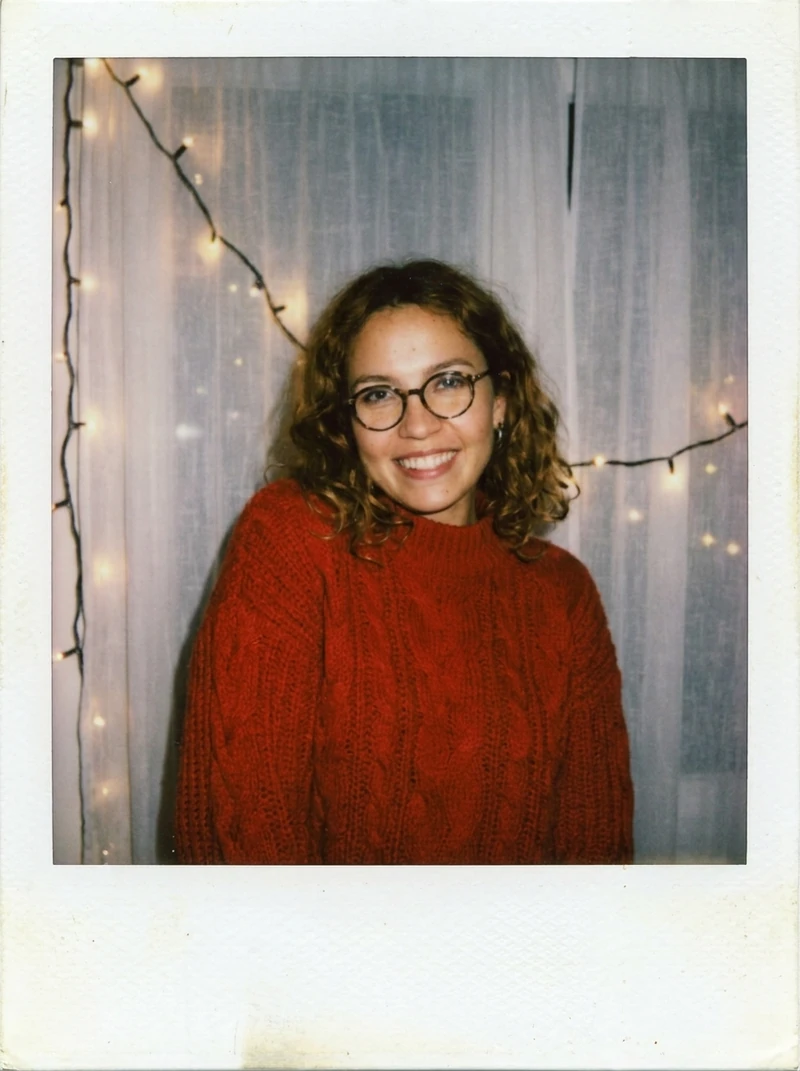
Copy the prompt we used.
Tested prompt
Instant polaroid photo of the woman from the reference image wearing a cozy red knit sweater, taken with a direct on-camera flash in front of a white curtain with warm Christmas string lights, candid smile, white polaroid frame border visible around the picture, retro early-2000s holiday look.
Budget for a second try: on Nano Banana Pro that is another 2 credits at our 2026-10-21 charge. The AI Christmas trend page covers the same scene family with other holiday looks. We did not test a New Year variant: not tested. Dreamina has separate Christmas and New Year polaroid pages (crawled 2026-10-20).
Is the trend still popular?
It is fading but still searched: in the week of 2026-10-18, “ai polaroid” stood at 11% of its peak (Google Trends US, via DataForSEO). The peak was the week of 2026-04-19, within the 12 months to 2026-10-20. The term stayed at or above 25% of peak for 40 of 52 weeks. For comparison, “ghostface ai trend” stayed above that line for 1 week and “ai action figure” for 14. One-week trends fade, but the polaroid look kept its audience for most of a year. That is why it sits in our AI effects library with a tested prompt, not on a one-week trend page.
Why we do not show the celebrity variant
We do not show or teach the celebrity version, because it uses a real person’s likeness without consent. Our content policy rules it out. In that version, a famous person stands in the polaroid next to you, in place of your younger self. Google’s AI Overview for “ai polaroid trend” (2026-10-20) still lists polaroids “with celebrities” among the trend’s formats. Comments in the r/GoogleGeminiAI younger-self thread (2025-09-30) indicate that its sample polaroid showed a celebrity with her younger self.
There is also an account risk. A commenter on that thread wrote on 2025-10-01 that this trend “got my account disabled” and linked a r/Bard post on the same risk. The comment does not say which version of the trend they made. We have not verified that claim: not verified as of 2026-10-21.
FAQ
How to do Polaroid AI trend?
Upload one clear photo of yourself to an image tool. Paste a prompt that describes a flash photo against a white curtain inside a polaroid frame, then generate. Our tested prompt is printed above. On 2026-10-21 it cost 1 credit on Seedream 5.0 Lite and 2 on Nano Banana Pro. The AI action figure prompt cost the same 1 and 2 credits.
How to make AI Polaroid for free?
Try Gemini or ChatGPT first. Their free image limits are not verified as of 2026-10-21, and we have not run our prompt on either. Dreamina says it offers free trial credits, without a stated amount.
How can I convert an image into a Polaroid?
Attach the photo as a reference and add “white polaroid frame border visible around the picture” to the prompt. Run it once unchanged before editing anything.
What is the Polaroid prompt for ChatGPT?
We tested our prompt on Higgsfield models only. We did not run it, or the tutorial prompt quoted above, in ChatGPT: not tested.
Checked 2026-10-21 by editorial review.