In this guide 7 sections
To make an AI dance video, upload one full-body photo and one short dance clip, or pick a template, and the tool moves your body to that choreography. We rendered one test clip on 2026-10-26: Kling 3.0 Motion Control on Higgsfield moved our start frame to a mannequin dance we generated ourselves, for 10 credits (at the top of the page, flaws included). We have not tested the dance apps below, so for them this page reports what the vendors state. Three of the four vendors we checked on 2026-10-20 state a free first try for the dance tool; none says how many clips.
Demand is steady but cooling: “ai dance video” stayed at or above 25% of its peak in 36 of the last 52 weeks and stood at 23% in the week of 2026-10-18, a week still running at fetch (Google Trends US). The peak week was 2026-01-11. Other long-running effects are in the AI effects hub.
Consent first. Use your own body and photo, or an adult who has agreed to this video. No minors, no celebrities, no one who has not said yes. Details are on the content policy page.
How do I make an AI video of me dancing?
Pick a full-body photo of yourself and a dance clip. Upload both, generate, then download (vendor pages, crawled 2026-10-20). GoEnhance’s own steps are the same: upload an image, choose a dance template, generate, download (goenhance.ai/ai-dance, crawled 2026-10-20). DomoAI adds a split: a template, or your own reference video through its Move workflow (domoai.app/scenarios/dance-trend, crawled 2026-10-20).
Two input styles exist, and the choice decides your cost. A template tool gives you a fixed library: GoEnhance states 30 built-in reference videos, or you upload your own. A motion-transfer tool copies the movement from any clip you supply. Kapwing’s guide states that text-only prompts gave “general rhythmic motion”, not exact choreography, in its own YMCA test of eight text-to-video models, Hailuo 2.3 and Sora 2 among them (kapwing.com, 2026-02-26), and recommends reference-based motion control for a specific dance.
The prompt does less than the inputs. DomoAI keeps the prompt for “energy, camera feel, outfit mood, or background style” and leaves the choreography to the reference video (domoai.app/scenarios/dance-trend, crawled 2026-10-20). For the photo, three vendors state the same requirement in their own words:
- DomoAI: “a clear body outline helps the motion read better” (domoai.app/scenarios/dance-trend, crawled 2026-10-20).
- DomoAI’s groove-dance template: a “clear, full-body photo”, person “facing forward” (domoai.app/create/template/groove-dance, crawled 2026-10-20).
- Kapwing: upright posture and high contrast against the background (kapwing.com, 2026-02-26).
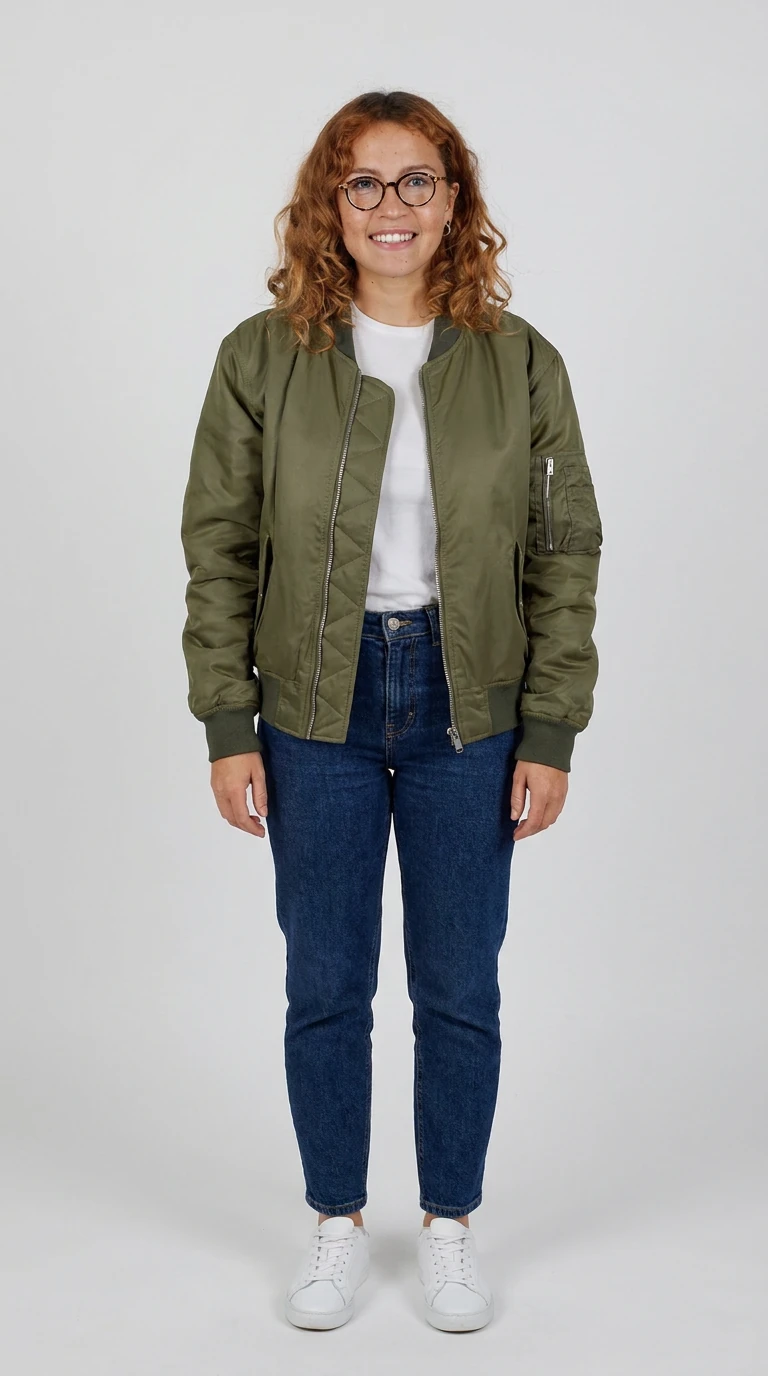
AI-generated test image of our fictional test character. Nano Banana Pro via Higgsfield, 2026-10-21, 2 credits, 1 try.
Above is the start frame we made for this page. The prompt asked for a neutral pose, relaxed arms, a plain light-gray studio background and feet fully in frame, in 9:16. It cost 2 credits (our charge, 2026-10-21) and took 1 try. By eye, it meets the three stated rules: the body outline is clear, the posture is upright, and the gray backdrop contrasts with the jacket and jeans. The white sneakers are the one area close to the backdrop tone. One record note: the job we requested as Nano Banana Pro came back labeled nano_banana_2, as did 10 of 10 jobs that day. We report it and draw no conclusion.
On 2026-10-26 this start frame became the test clip at the top of the page: Kling 3.0 Motion Control via Higgsfield, driven by a clip of a clothed mannequin dancing that we generated with Kling 3.0. It is the same run as in our motion control guide, which has the full notes.
Is there a free AI dance video app? (checked 2026-10-20)
Yes, if a free dance app means a free first try: three of the four vendors below state one for the dance tool (crawled 2026-10-20). Only one gives a number for the dance tool: GoEnhance states 30 free tokens after login (goenhance.ai/ai-dance, crawled 2026-10-20). Every cell below is what the vendor states, not what we measured. “Not stated” means the page is silent.
Vendor and page | Free limit as stated | Watermark as stated | Sign-up as stated | Input and output as stated |
|---|---|---|---|---|
GoEnhance, goenhance.ai/ai-dance (crawled 2026-10-20) | "30 free tokens after logging in"; each generation uses tokens by model and settings. Free and Basic plans: personal use only. | "Free outputs may include a watermark"; paid plans "generally" remove it. | Browse templates without an account; log in to get tokens and generate. | Photo plus one of 30 reference videos, or your own. 480p and 720p. Models: Move, Kling Motion, Replace. |
GoEnhance, goenhance.ai/ai-dance/ai-tiktok-dance (crawled 2026-10-20) | "Start with free access/credits". No amount. | Not stated | Not stated | One photo, "beat-synced clip". Length not stated. |
DomoAI, domoai.app/create/template/groove-dance (crawled 2026-10-20) | Page says "Fast and Free" and "without any upfront costs". No amount. | Not stated | Not stated | One photo (people, pets, cartoons). Output 3 or 5 seconds. |
DomoAI, domoai.app/scenarios/dance-trend (crawled 2026-10-20) | Not stated | Not stated | Not stated | Full-body subject plus a dance reference video or the Move workflow. |
Dreamina, dreamina.capcut.com/create/ai-dance-video-generator (crawled 2026-10-20) | FAQ: "free trial credits". The couple-dance page (dreamina.capcut.com/ai-video/ai-couple-dance-video-generator) says "daily free credits". No amount. | Dance page: not stated. Pricing page: paid plans list "Remove the Dreamina watermark in downloads" (crawled 2026-10-20). | Create links carry | Photo or prompt. Length not stated. |
Kapwing, dance guide on kapwing.com (2026-02-26) and kapwing.com/pricing (crawled 2026-10-20) | Pricing: Free plan with 10 credits; the plan lists them for auto-subtitling and text to speech. Credits per dance clip: not stated. | Pricing: free plan "unlimited exports with a watermark". Whether this applies to the dance tool: not verified as of 2026-10-21. | Not stated | Subject image plus a 3 to 10 second reference clip (MOV, MP4 or AVI), powered by Kling 2.6 motion control. |
Treat “free” on these pages as a first try, and check the watermark yourself before posting.
Two vendors in our SERP set were not crawled. Google’s AI Overview for “ai dance video” says Viggle has “over 10,000 free dance templates”, citing viggle.ai (Google US, 2026-10-20); not verified as of 2026-10-21. freebeat’s terms: not verified as of 2026-10-21. Monet lists an AI Dance effect in its navigation, but we did not crawl that page, so its terms are not stated here.
Pets dance too: our AI pet dance video page runs one fictional dog photo through Kling 3.0 and Hailuo 02 (2026-10-27), and GoEnhance’s note on four-legged bodies is in the failures section below.
How do people make those AI dancing videos on TikTok?
They copy the movement from a real clip onto a photo, not from a text prompt. This is motion transfer: you supply a character image and a driving video, and the model applies the video’s body motion to the image. Higgsfield describes its Genjutsu route the same way: copy actions and camera onto your reference image (Higgsfield catalog read, 2026-10-21).
The practical steps, in the order that costs least:
- Prepare the photo: full body, facing the camera, feet in frame, plain background, one person.
- Prepare the reference: a 3 to 10 second clip (Kapwing’s stated limit) with one main dancer and visible limbs, no crowd (DomoAI’s guidance).
- Start on a free tier from the table and generate once. Check the output for watermark and face drift.
- Add music in your editor rather than the generator, and do the music sync there by cutting to the beat. Use audio you own or are licensed to use. Dreamina’s page states the rule: pair the clip with “music or audio you own or are licensed to use” (dreamina.capcut.com, crawled 2026-10-20).
“Which AI is best for dancing?” has no tested answer here. Kapwing names Kling Motion Control, powered by Kling 2.6, as the route that follows choreography (kapwing.com, 2026-02-26); that is a vendor-side recommendation. We have run one Kling 3.0 Motion Control clip and no same-input comparison.
Motion control on Higgsfield vs dance templates elsewhere
Higgsfield bills Kling Motion Control in credits per 5 seconds. The pricing page lists four rows (crawled 2026-10-20): Kling 2.6 Motion Control at about 5 credits per 5 seconds in 720p and about 7 in 1080p, and Kling 3.0 Motion Control at about 7 in 720p and about 12 in 1080p. A 10-second dance in Kling 3.0 Motion Control at 720p therefore comes to about 14 credits. That is our arithmetic from the page rows, not a measured charge. Our one measured charge was higher than the row: 10 credits for a 5-second Kling 3.0 Motion Control clip at 720 × 1280 in standard mode (2026-10-26). The same page lists Kling 3.0 Motion Control on Plus and Ultra only; Starter gets Kling 2.6 Motion Control, and the Free plan gets neither.
Templates elsewhere give you a ready dance and a free first try, with the dance fixed to the library. Motion control gives you any dance you can film, and you pay credits from the first clip, because the Higgsfield free plan has no credits (Higgsfield help center, fetched 2026-10-21). See what is free on Higgsfield and the credit cost section. The full route, including a motion-control walkthrough, is on the motion control template page. Kling’s own plans are covered on the Kling tool page.
Paying makes sense when you need a choreography no library template offers, or an output without the free-tier watermark.
Disclosure: we may earn a commission if you subscribe through links marked “(commission link)”. It does not change what we test, and the free routes above come first. Details are on our affiliate disclosure page.
Recreate this with motion control on Higgsfield (commission link)
What dance moves are trending?
Six of the 30 presets in Higgsfield’s Genjutsu “Trending” list on 2026-10-21 are trending dance presets, which is 20%. The list order is Higgsfield’s own ranking at fetch time (Higgsfield catalog read, 2026-10-21). We counted by name: four names contain “Dance”, one “Groove” and one “Rhythm”. A preset named for a performance, such as Chandelier Lounge Performance at position 3, is not in the count. We considered that preset for a test and did not run it, because its driving video shows real people. We read the names only and did not watch the previews.
Position | Preset name (Higgsfield catalog) |
|---|---|
5 | Athlete Dance Swap |
10 | Truck Stop Groove |
14 | Boutique Terrace Dance |
20 | Ponytail Dance Spin |
21 | Canine Rhythm Flow |
29 | Feline Dance Duo |
Preset names are catalog labels, not names of choreography, so this list does not tell you which TikTok dance each one copies. The mapping to a social trend: not verified as of 2026-10-21.
Some trends lean on a song, not a move: Kapwing’s Alors on Danse and Raindance guides each build a two-photo scene around a track (kapwing.com, crawled 2026-10-20). Music rights stay with you.
Watermark-free options and what they cost
No dance page we crawled states a watermark rule for every plan. Two vendors say free output may carry one: GoEnhance on its dance page, Kapwing on its pricing page. GoEnhance says “free outputs may include a watermark” (goenhance.ai/ai-dance, crawled 2026-10-20). Kapwing’s pricing page says its free plan exports with a watermark, and its “No Kapwing watermark” line sits in the paid Pro plan (kapwing.com/pricing, crawled 2026-10-20). Dreamina’s pricing page lists “Remove the Dreamina watermark in downloads” on its paid plans (dreamina.capcut.com/pricing/dreamina-price, crawled 2026-10-20). The AI kissing video guide records the vendors' watermark statements for kiss effects.
Cost routes, cheapest first:
- Free first try, with the watermark, to check motion quality.
- A paid plan on the same vendor. GoEnhance says paid plans “generally” export without the mark. Kapwing and Dreamina list watermark removal on paid plans. DomoAI’s pages state no watermark rule. Plan prices are not compared on this page.
- Credits on Higgsfield, from about 5 credits per 5 seconds for Kling 2.6 Motion Control at 720p on Starter or higher (pricing page, crawled 2026-10-20). Whether Higgsfield output carries a watermark on a paid plan: not verified as of 2026-10-21.
Commercial use is a separate rule. GoEnhance limits Free and Basic plans to personal use and lists Standard, Pro and Mega for commercial use, “provided you have the necessary rights” to the uploads (goenhance.ai/ai-dance, crawled 2026-10-20).
What usually fails: hands, spins, faces
Vendors name the failure causes in their own guidance, and our one clip adds its own. On fast moves, around 1.9 s and 4.4 s, the face blurred and the glasses went hazy, and the smile turned neutral; the hands stayed fists, as in the driving clip. Two earlier runs, driven by a faceless mannequin that ends in profile, failed with no error text and were refunded. Dreamina’s page tells you to check “the face, hands, feet, balance, costume, and final pose” on each version (dreamina.capcut.com, crawled 2026-10-20). DomoAI warns that crowded reference scenes give less clean choreography transfer (domoai.app/scenarios/dance-trend, crawled 2026-10-20). GoEnhance notes that a four-legged body “does not map perfectly” to every human routine (goenhance.ai/ai-dance/kling-ai-dance, crawled 2026-10-20). No page we crawled names spins as a failure cause, and our own spin result is “not tested”.
Before a paid attempt, run this check on your inputs:
- Feet fully in frame in the photo, as in our start frame.
- Hands visible in the photo. Dreamina lists hands among the parts to check in each output; our start frame keeps the arms at the sides with both hands in view.
- One dancer in the reference, no crowd, 3 to 10 seconds.
- A photo of a person who agreed, an adult, with no one else in frame.
Budget for a second try. On Higgsfield’s Kling 3.0 Motion Control 720p row that is about 7 more credits per 5 seconds on Plus or Ultra (pricing page, crawled 2026-10-20); our own charge was 10 per 5 seconds (2026-10-26). We have not run a same-input test on other dance services.
Sources cited from vendor pages as dated. For decisions involving likeness, consent or music licensing in your country, check local rules.